

If you’re preparing for CUET UG 2026, there’s an important update from the National Testing Agency that you simply can’t ignore.
A new notice has been released regarding CUET 2026 photo mismatch issues, and if you fall into this category, you must submit a verification certificate. Missing this step can lead to application rejection or even denial of entry at the exam center.
Watch Full Explanation (Video Guide) –
What Is the CUET Photo Mismatch Notice?
On 7th April, NTA released a public notice for students whose:
- Live captured photo (during form fill)
- ID proof photo (uploaded document)
did not match properly during verification.
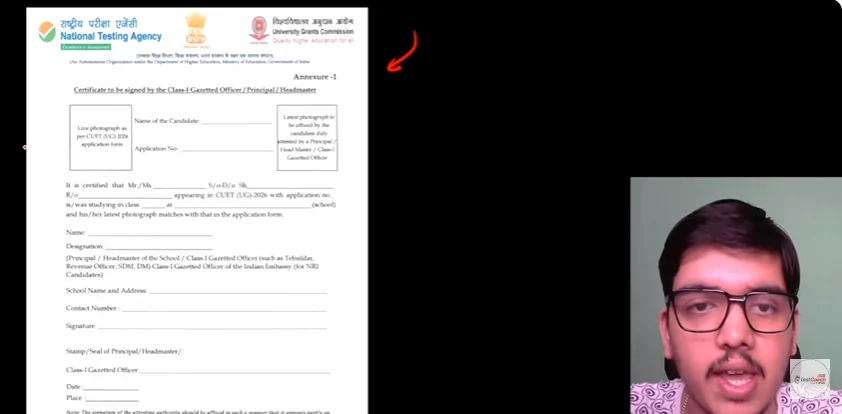
To resolve this, NTA has introduced a Photo Verification Certificate that affected students must submit.
Also Explore – CUET Pyqs
Who Needs to Submit This Certificate?
Not every student needs to worry.
You only need to submit the certificate if:
- You received an official email from NTA, OR
- You see the option “Upload Photo Verification Certificate” on your CUET portal
If you don’t see this option and only see “Print,” you’re safe.
How to Check If Your Photo Is Mismatched?
Follow these steps:
- Visit the official CUET portal
- Log in using:
- Application number
- Password
- Look for this option:
Upload Photo Verification Certificate
- If visible → ❌ Your photo is mismatched
- If not visible → ✅ No issue
Where to Download the Certificate?
Here’s how to get your certificate:
- Click on Upload Photo Verification Certificate
- Select Print Certificate
- Download the PDF
The good part: Your live captured photo is already auto-added in this certificate.
How to Fill the Certificate Properly?
Once downloaded, complete the following:
- Add your latest passport-size photograph
- Fill in:
- Name
- Application number
- Required details
- Get it signed by:
- School/College Principal OR
- Class 1 Gazetted Officer (SDM/DM/Tehsildar)
How to Upload the Certificate?
After completing the document:
- Convert it into a PDF file
- Go back to your CUET portal
- Click on Upload option
- Submit the certificate
Start Your CUET 2026 & 12th Board Prep Now!